




How to merge duplicates with the HubSpot-Salesforce Integration on
Updates to the HubSpot-Salesforce integration allow merges while the integration is active. However, native merging operates locally inside HubSpot without updating or merging the corresponding records in Salesforce.
When you merge two companies in HubSpot, the secondary company is deleted in HubSpot, and its associated Contacts, Deals, and activities move to the primary company. In Salesforce, the secondary Account remains active and untouched. The Contacts that moved to the primary company in HubSpot are still linked to the secondary Account in Salesforce.
On the next sync cycle, Salesforce detects the active secondary Account. Depending on your sync rules, Salesforce either creates a brand new duplicate company in HubSpot or desynchronizes the contacts because the Account IDs no longer match across both platforms.
Why current workarounds aren't enough
To avoid breaking the sync, teams attempt to solve the problem using manual habits, integration configuration tweaks, custom code, or multi-step software setups. Because none of these approaches merge both CRMs directly at the same time, they function as workarounds by default:
- Teams merge records in Salesforce first and manually clean up the left-behind contacts in HubSpot, or manually move deals and contacts from a duplicate company to the primary Account before deleting the secondary record.
- Teams alter integration rules to block automatic company creation on form submissions, restrict integration user permissions to primary records, block auto-syncing until records are marked clean, or set HubSpot to "Do Nothing" when records merge in Salesforce.
- Teams write custom Apex triggers in Salesforce to catch incoming duplicates, set up third-party-app workflows to verify records before creation, or build custom formula fields (such as Name + Phone) to identify matches across platforms.
- Admins pause continuous syncing, export both databases to spreadsheets, manually align Record IDs, clean up duplicates offline, and re-import the files. This approach is static, meaning when the sync resumes, new records overwrite changes or re-create duplicates.
- Teams use external software that requires multi-pass rule setups, custom "Master Record" checkbox fields, or changing deletion rules to manage the sync indirectly.
Across all these methods, attached Contacts, Deals, and timeline histories frequently lose their alignment across platforms or require constant manual monitoring to prevent integration errors.
Merging duplicates with Dedupely
Dedupely detects the HubSpot-Salesforce Integration on its own, without custom fields or any change to your integration settings.
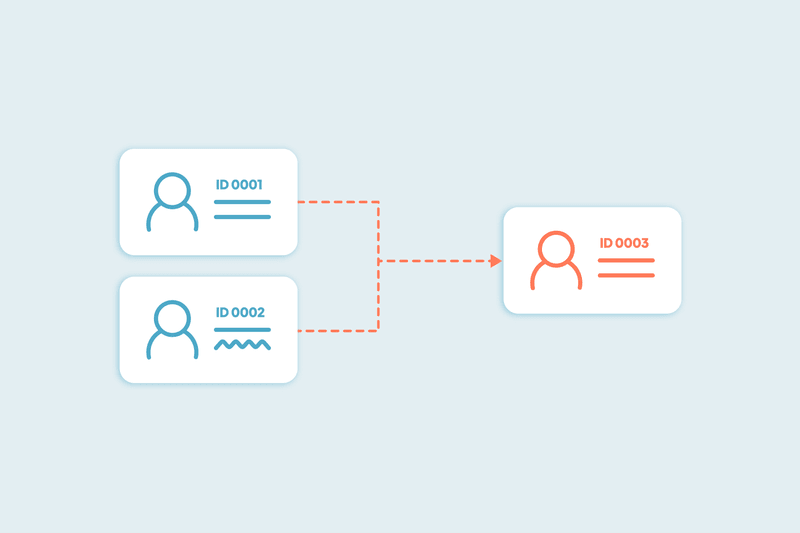
When you merge duplicate companies, Dedupely merges the records in both HubSpot and Salesforce together in a single action, keeping records aligned so Salesforce won't recreate the duplicate on the next sync, and all associated contacts and deals stay linked to the primary record in both systems.
Step-by-step quick guide
- Connect your HubSpot and Salesforce instances to Dedupely.
- Go to CRM Settings in Dedupely and click the "HubSpot-Salesforce Integration" tab.
- Select the complementary CRM instance from the dropdown menu to link the two systems globally across all objects.
- Set up your Search Pads, with specific criteria by selecting fields and field-level match options.
- Define your custom merge rules to choose winning records or field-level values.
- Select how to handle ongoing deduplication:
- Manually merge specific duplicates or edge cases.
- Bulk merge legacy data.
- Auto match to scan for duplicates in the background and receive a notification when matches reach a specific number you set. Nothing will merge until you review and click "Merge".
- Auto merge to scan and merge duplicates automatically in both CRMs on a schedule you choose.
FAQs about HubSpot-Salesforce Integration deduplication
What do I need to start merging with HS+SF sync on?
You need a Dedupely account with both your HubSpot and Salesforce instances connected and sync. If Dedupely detects an active sync on a record but only one CRM is connected, it blocks the merge and prompts you to connect the missing isntance.
What if I manage multiple HubSpot or Salesforce instances?
In Dedupely, go to your CRM Settings and select the specific instance you want to pair, from the dropdown menu to link the exact HubSpot and Salesforce accounts you want to deduplicate together, and have the SFDC sync on.
Do I need to create a custom "master record" field or change CRM deletion settings before merging?
No. Dedupely automatically detects the active sync and merges the records across both CRMs at the same time, removing the need for staged or conditional merging steps.
Can I preview the results without merging?
Yes. Click "View Match Details" (the three vertical dots on the left of a duplicate set) and review the left panel of the pop-up to see the merge results of each field.
Will merging records delete activity history?
No. Associations and activity history move to the primary record in both CRMs.
Can I undo a merge?
No, but you can download your merging history as a CSV file and import it back into your CRM to restore the original records.
Merging duplicates without breaking your HubSpot-Salesforce Integration
Merging synced HubSpot and Salesforce instances shouldn't require custom fields, complex settings changes, or manual spreadsheet cleanup. Identifying sync connections directly and merging records in both CRMs at the same time removes duplicate records without breaking account links or desynchronizing contacts.



 Or sign up with Google
 Pipedrive Marketplace
  Dedupely Intelligence











